Understanding Next.js Docker Images
 Jonas Scholz
The first time you read a Next.js Dockerfile, it can look like several Dockerfiles stacked on top of each other. There is a reason for that: installing dependencies, building the app, and serving it need different files.
Four parts, one final image
The original example divided the Dockerfile into a base image, dependency installation, build, and runtime:
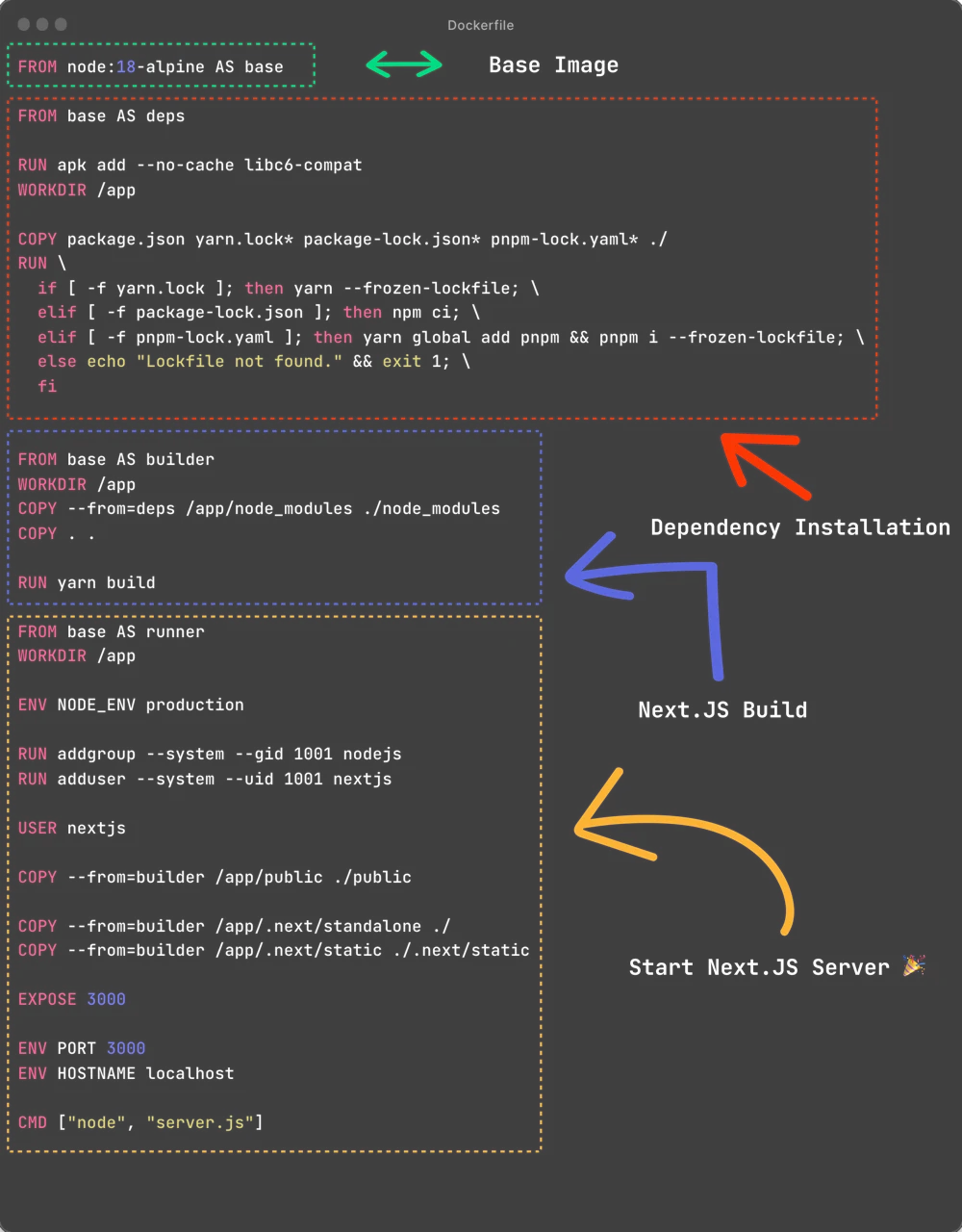
The diagram shows the original Node 18 example. The complete Dockerfile below uses Node 24 and npm, so you can copy the current example instead of transcribing the screenshot.
First, enable standalone output in your existing Next.js configuration:
// next.config.mjs
const nextConfig = {
  output: "standalone",
};

export default nextConfig;
Keep any other configuration your project needs. Standalone output traces the server's dependencies and places the required files in .next/standalone. We will run its server.js directly.
FROM node:24-bookworm-slim AS base
WORKDIR /app

FROM base AS dependencies
COPY package.json package-lock.json ./
RUN npm ci

FROM base AS build
COPY --from=dependencies /app/node_modules ./node_modules
COPY . .
RUN mkdir -p public && npm run build

FROM base AS runtime
ENV NODE_ENV=production
ENV PORT=3000
ENV HOSTNAME=0.0.0.0
COPY --from=build --chown=node:node /app/public ./public
COPY --from=build --chown=node:node /app/.next/standalone ./
COPY --from=build --chown=node:node /app/.next/static ./.next/static
USER node
EXPOSE 3000
CMD ["node", "server.js"]
This assumes an npm project with a committed package-lock.json and a build script that runs next build. Add a .dockerignore before building:
node_modules
.next
.git
.env
.env.*
npm-debug.log
The base image
All stages start from the same Node image. Here I use Debian slim to avoid mixing libc implementations when dependencies include native code. Alpine can also work, but check native dependencies rather than adding a compatibility package blindly.
The major version in the tag is not a permanent pin. Rebuild images to get fixes, and use a digest when your release process requires an exact base image.
Dependency installation
The dependency stage copies the package manifest and lockfile, then runs npm ci. It happens before copying the source so editing a page does not force Docker to reinstall unchanged packages.
The original Next.js example supported npm, Yarn, and pnpm by checking which lockfile existed. You only need the branch for the package manager your project actually uses. Keep one package manager and its lockfile consistent between development and the container build.
Building the app
The build stage receives node_modules from the dependency stage, then adds the source and runs npm run build. The mkdir -p public ensures the later copy also works for projects without a public directory.
Build-time values must be available at this point. In particular, NEXT_PUBLIC_ values are included in the client bundle; setting a different value when the container starts will not rewrite that bundle. Keep secrets out of public variables and the client code.
Running the app
The final stage copies three things: the standalone server, .next/static, and public. Standalone output does not copy those static directories for you. Missing them can leave a page without its JavaScript, styles, or images.
COPY --chown=node:node gives the runtime user ownership of these files, including the .next directory used by runtime caches. USER node then runs the server without root privileges.
HOSTNAME=0.0.0.0 is important. Binding the server to localhost would prevent requests through the container's network interface. PORT=3000 sets the listening port, while EXPOSE only documents it.
The final command starts the standalone server directly. It does not use next start or run another build.
Check the result
docker build -t next-app .
docker run --rm --name next-app -p 3000:3000 next-app
Open http://localhost:3000. Check a page, a static asset, and a server route if your app has one. A successful HTML response alone does not prove the static files were copied correctly.
The official Next.js Docker example is a useful reference for more complex setups. Monorepos may need output tracing settings and a different server path. Once your image works locally, deploy the repository on Sliplane with HTTP port 3000.