
How to Dockerize FastAPI
 Jonas Scholz
A FastAPI container needs Python, your dependencies, and a command that starts the server. Here is the Dockerfile I use as a starting point, followed by the details that matter when you deploy it.
Start with the Dockerfile
This example assumes your app is in app/main.py and exports a FastAPI instance named app. Commit a requirements.txt with the dependencies your project uses. The fastapi command requires the CLI dependencies included in fastapi[standard]; installing only the minimal fastapi package is not enough.
FROM python:3.13-slim
WORKDIR /code

COPY requirements.txt ./
RUN pip install --no-cache-dir -r requirements.txt

RUN useradd --create-home app
COPY ./app ./app
USER app

EXPOSE 3000
CMD ["fastapi", "run", "app/main.py", "--host", "0.0.0.0", "--port", "3000"]
The base image uses Python 3.13. Use a supported Python version that your dependencies support. If a dependency needs system libraries, install those explicitly instead of hoping they are included in the base image.
Create a .dockerignore beside the Dockerfile:
__pycache__
*.py[cod]
.venv
venv
dist
build
.git
.env
.env.*
This keeps local virtual environments, bytecode, and secret files out of the build context. Supply runtime secrets through environment variables when you deploy.
What each step does
WORKDIR sets the directory for subsequent commands. Copying requirements.txt before the application lets Docker reuse the dependency layer when only your Python code changes. pip install --no-cache-dir avoids storing pip's download cache in the image.
The final COPY adds the app. The container runs as the unprivileged app user; the source files remain readable without being writable by that user. Give it a separate writable directory if your application needs to create files.
fastapi run starts the production server. --host 0.0.0.0 makes it reachable through the container network, and --port 3000 matches the port published below. EXPOSE documents the port; it does not publish it on your machine.
For a different module or application layout, change the command to match it. The FastAPI container documentation covers this in more detail.
Build and run locally
docker build -t fastapi-app .
docker run --rm --name fastapi-app -p 3000:3000 fastapi-app
Open http://localhost:3000/docs to check FastAPI's generated API documentation. If you disabled that endpoint, request one of your own routes instead. Check docker logs fastapi-app from another terminal if the container exits or fails to respond.
The command above runs a single server process. Decide how to scale processes or containers based on your workload and the memory available. Do not add a large worker count without measuring what each process needs.
Deploy on Sliplane
Commit the Dockerfile and .dockerignore to your repository. In Sliplane, create a service from that GitHub repository and set its HTTP port to 3000. Add the environment variables your app needs, then deploy.
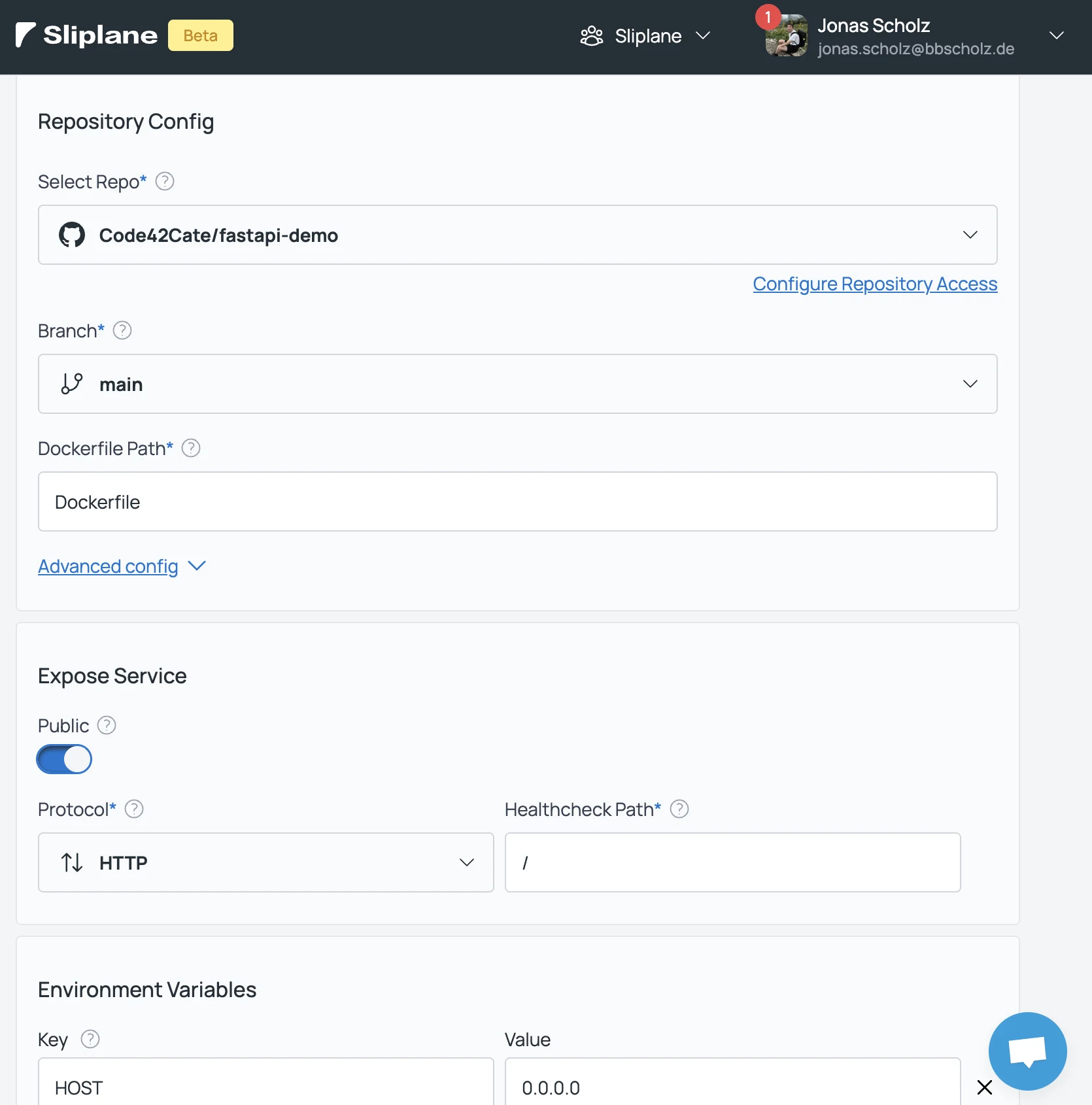
The screenshot shows the interface used for the original post. The important settings are the repository, Dockerfile path, and application port. After deployment, use the service URL to test a real API request and check the logs. Configure persistent storage separately if the app writes data that must survive a deployment.